Building an Offline Voice Transcription Workbench on Raspberry Pi with Flask, Microsoft Foundry Local, and AudioWorklet
Build a fully local voice transcription workbench on Raspberry Pi with Flask, Microsoft Foundry Local, AudioWorklet, Whisper, and Qwen3.
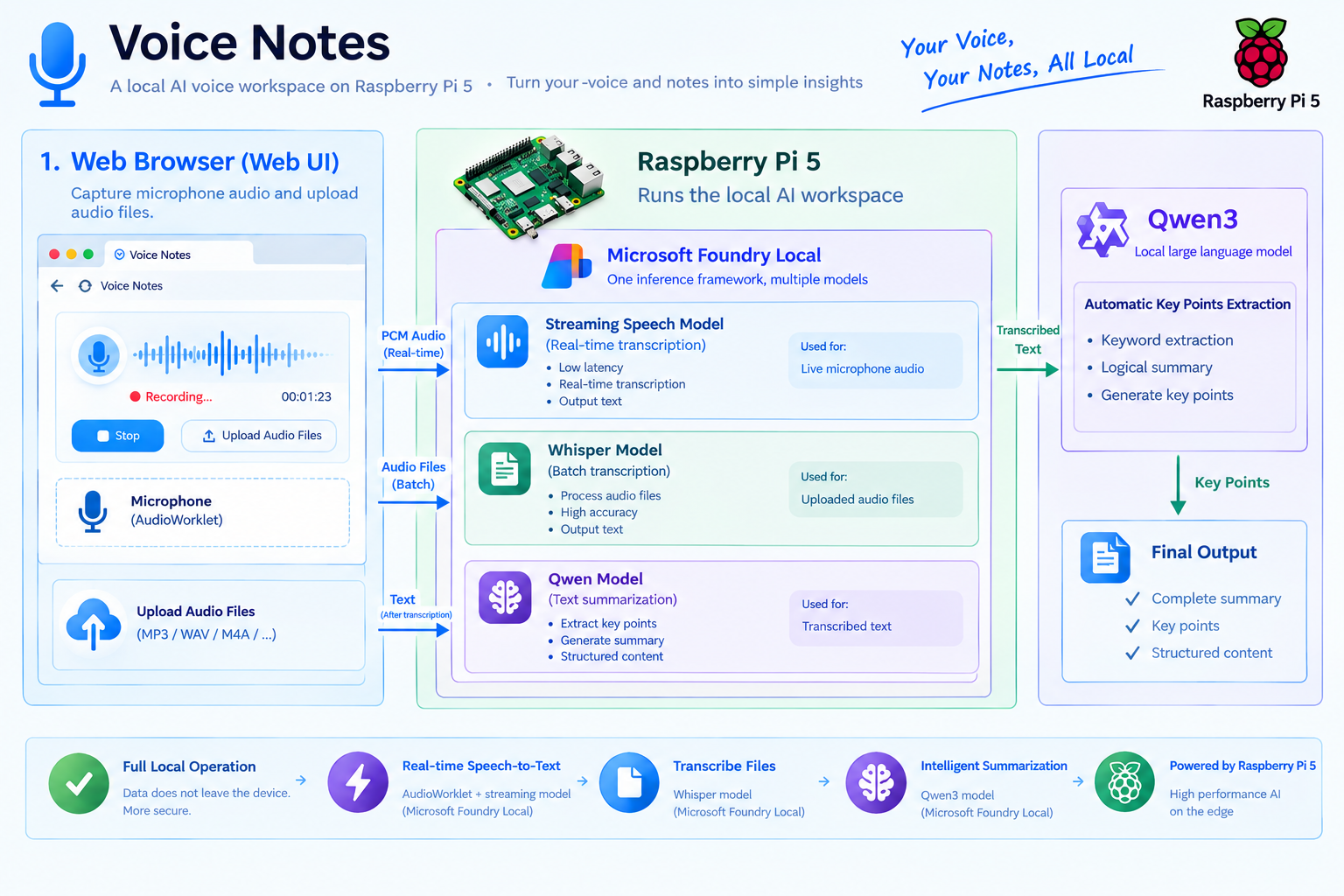
This article presents Voice Notes, a single-user voice workbench that runs entirely on a Raspberry Pi. The browser captures microphone audio with AudioWorklet; Flask sends PCM audio to a streaming speech model hosted by Microsoft Foundry Local; Whisper handles uploaded audio files; and a local Qwen3 model extracts useful notes after transcription. Audio, transcripts, and JSON records remain on the device.
The measurements below come from four Raspberry Pi 5 benchmark runs covering Whisper file transcription, English streaming transcription, Chinese streaming transcription, and Qwen3 summarization.
1. Why run speech transcription locally?
Meeting notes, classroom notes, interviews, and field inspections often share three constraints:
- The audio may be sensitive and unsuitable for a third-party cloud service.
- Connectivity may be unreliable.
- Long recordings can make per-minute or per-token cloud pricing expensive.
A Raspberry Pi and a USB microphone—or a network camera with a built-in microphone, as used in this experiment—can become a small, low-power recorder and note taker. The challenge is fitting speech recognition and language-model inference into a resource-constrained device.
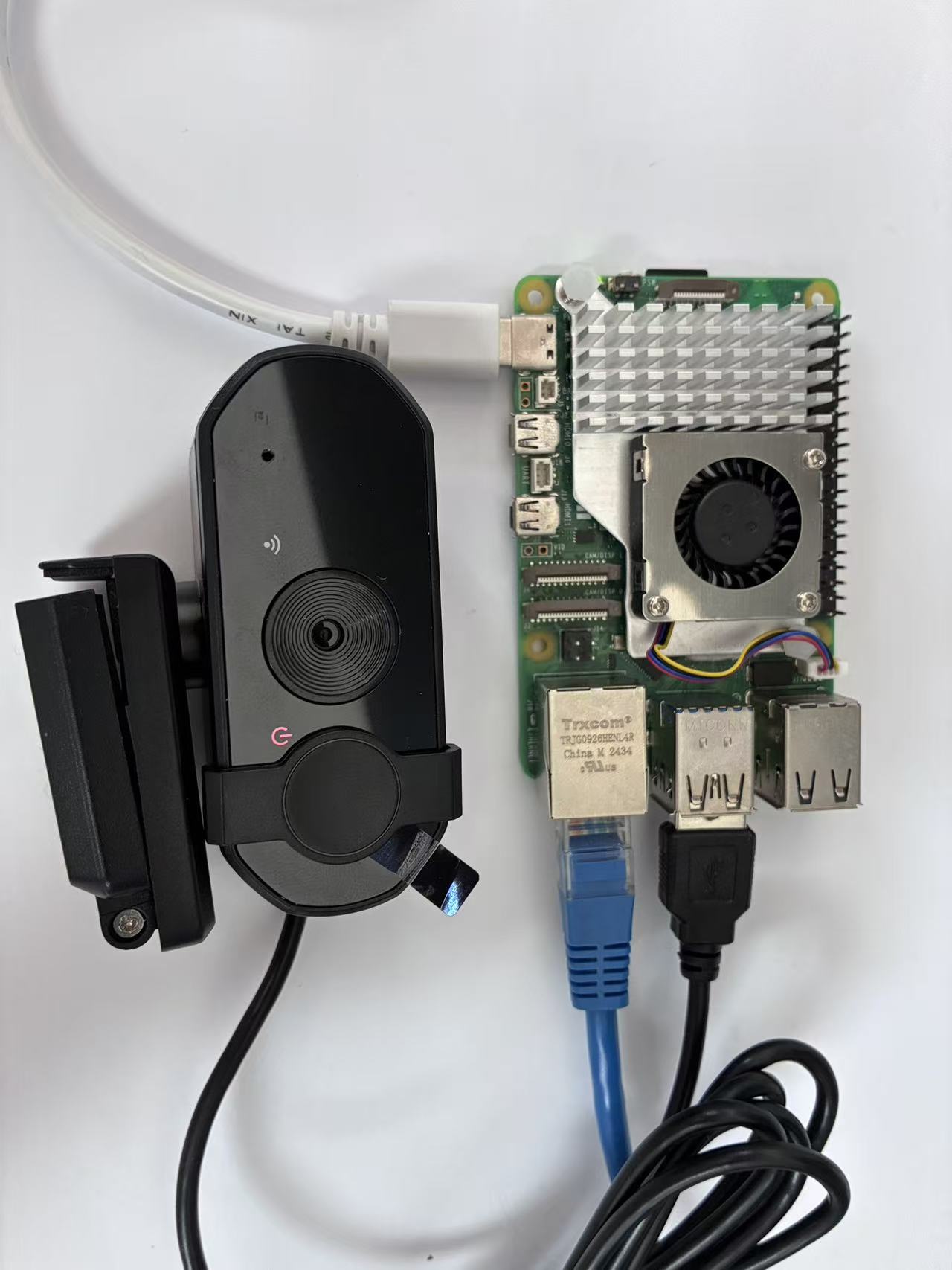
The workbench provides three capabilities:
- Live microphone transcription: confirmed text appears normally while provisional text is shown in a lighter style.
- Batch audio transcription: up to ten WAV or MP3 files can be uploaded. One failed file does not cancel the others.
- Local summaries: when live transcription ends, Qwen3 extracts topics, key points, decisions, and action items.
Each job also saves a 16 kHz mono WAV file, a TXT transcript, and a JSON record. The browser can play the recording and download all three artifacts.
The project source code is available on GitHub at shijiong/flask-audio-transcription, so you can explore the implementation alongside this article.
Video demo: Watch the Voice Notes demo on Bilibili.
2. Foundry Local and the model choices
Microsoft Foundry Local is an on-device AI runtime with SDKs, a curated optimized model catalog, and hardware adaptation. The application calls the Python SDK in-process; it does not need an Azure subscription or a remote inference endpoint.
“Local” still has an important qualification: the first model and runtime downloads need network access. After the models are cached, inference can run without a network connection. Memory, disk space, power, and inference time are still real costs.
The application uses the following aliases:
| Purpose | Model alias | Notes |
|---|---|---|
| Multilingual live transcription | nemotron-3.5-asr-streaming-0.6b | Streaming ASR with automatic language support |
| English live transcription | nemotron-speech-streaming-en-0.6b | English-only streaming ASR |
| File transcription | whisper-small or whisper-tiny | tiny is lighter; small generally gives better quality |
| Summarization | qwen3-0.6b | Small chat model used for local note extraction |
Model aliases can change with the catalog and platform. Always verify them on the target device with catalog.get_model() instead of assuming that a name present in the UI is available on ARM64.
Foundry Local is optimized for a single user on constrained hardware rather than for server-style concurrency. That leads to three design decisions:
- only one transcription or summarization job runs at a time;
- the speech model is unloaded before Qwen3 is loaded;
- the service listens on
127.0.0.1by default.
3. Architecture and request flow
The system is split into a browser layer, a Flask service layer, an in-process Foundry Local inference layer, and local storage. The browser converts microphone data to 16 kHz PCM16. Flask schedules work through short HTTP requests and polling. The models run in the Raspberry Pi process, and recordings and results are written locally.
The main endpoints are:
| Method | Route | Purpose |
|---|---|---|
| GET | / | Render the application and inject the process token and model list |
| GET | /api/config | Return model options and recording limits |
| POST | /api/live | Create a live transcription job |
| POST | /api/jobs/<id>/audio | Upload an ordered PCM chunk |
| POST | /api/jobs/<id>/stop | Finish input, save artifacts, and generate a summary |
| POST | /api/files | Start a multipart batch transcription job |
| GET | /api/jobs/<id> | Poll job status and results |
| GET | /api/jobs/<id>/artifacts/<name> | Download WAV, TXT, or JSON artifacts |
The application uses HTTP polling rather than WebSockets or server-sent events. A 100 ms polling interval is responsive enough for subtitles, easier to debug, and more tolerant of reconnects on a small Flask deployment.
Live jobs move through states similar to:
1
loading -> recording -> stopping -> summarizing -> saving -> done
The public saving state prevents the UI from showing download links before TXT and JSON files have actually been written. File jobs use a shorter loading -> transcribing -> saving -> done flow.
4. Raspberry Pi preparation
The recorded test device was a Raspberry Pi 5 Model B Rev 1.1 with four logical cores, 8 GB RAM, Debian GNU/Linux 13 (trixie), ARM64, and approximately 36.5 GB free on a 58.2 GB root filesystem. GPU detection reported no GPU, so inference used the CPU. The CLI version was 0.10.3.
These are recorded values, not official minimum requirements. Use a 64-bit ARM Linux installation, adequate storage for model caches, and active cooling. Check the device before installing:
1
2
3
4
uname -m
cat /etc/os-release
free -h
df -h /
uname -m should normally report aarch64; armv7l indicates a 32-bit environment and is not compatible with the ARM64 archive used here.
Create a virtual environment and install the three runtime dependencies:
1
2
3
Flask>=3.1,<4
foundry-local-sdk>=2.1.0,<3; sys_platform != "win32"
foundry-local-sdk-winml>=2.1.0,<3; sys_platform == "win32"
1
2
3
4
python3 -m venv .venv
source .venv/bin/activate
python -m pip install --upgrade pip
python -m pip install -r requirements.txt
The Linux and Windows packages expose the same Python import name, foundry_local_sdk. Install dependencies with the same interpreter that starts Flask. If the SDK itself is missing, use that interpreter explicitly:
1
python -m pip install -r requirements.txt
5. Install Foundry Local and cache the models
For the recorded setup, download foundry-0.10.3-linux-arm64.tar.gz from the CLI Preview 0.10.3 release:
1
2
3
4
5
6
7
cd ~/Downloads
curl -fL -o foundry-0.10.3-linux-arm64.tar.gz \
  https://github.com/microsoft/foundry-local/releases/download/cli-preview-0.10.3/foundry-0.10.3-linux-arm64.tar.gz
sha256sum foundry-0.10.3-linux-arm64.tar.gz
tar xzf foundry-0.10.3-linux-arm64.tar.gz -C /home/pi
cd /home/pi/foundry-0.10.3-linux-arm64
./lib/foundry --version
The recorded SHA-256 digest is:
1
c530e6354f29335fee4fd676b0f945e53a2dedcfc73c64fe336a39d27dbaec82
Keep the complete extracted directory; copying only the executable can omit required runtime files.
The SDK initialization is deliberately small:
1
2
3
4
5
from foundry_local_sdk import Configuration, FoundryLocalManager

FoundryLocalManager.initialize(Configuration(app_name="foundry_local_samples"))
manager = FoundryLocalManager.instance
manager.download_and_register_eps()
On Linux, execution is normally CPU-based unless a compatible execution provider is available. On SDK 2.1.0 Linux installations, the project also follows the sample application’s compatibility workaround:
1
2
if sys.platform.startswith("linux") and version("foundry-local-sdk") == "2.1.0":
    os.environ.setdefault("CI", "1")
Before starting the web application, verify the catalog:
1
2
3
4
5
6
7
8
9
10
11
ALIASES = [
    "nemotron-3.5-asr-streaming-0.6b",
    "nemotron-speech-streaming-en-0.6b",
    "whisper-small",
    "whisper-tiny",
    "qwen3-0.6b",
]

for alias in ALIASES:
    model = manager.catalog.get_model(alias)
    print(alias, "available" if model else "not found")
The Raspberry Pi measurements recorded these download sizes:
| Model | Size |
|---|---|
nemotron-3.5-asr-streaming-0.6b | 756 MB |
nemotron-speech-streaming-en-0.6b | 696 MB |
whisper-small | 438 MB |
whisper-tiny | 131 MB |
qwen3-0.6b | 593 MB |
The first call to model.download() obtains the model and reports progress. Later runs load it from the local cache.
6. Browser audio capture with AudioWorklet
Browsers commonly expose microphones at 44.1 or 48 kHz, while the speech models expect 16 kHz mono PCM. Doing conversion in the main JavaScript thread can cause UI stalls and dropped chunks, so the workbench uses an AudioWorkletProcessor.
The worklet performs four operations:
- average all input channels into mono;
- continuously resample to 16 kHz;
- clamp and quantize samples to little-endian signed 16-bit PCM;
- emit 1,600 samples per chunk, exactly 100 ms at 16 kHz.
The resampling code uses weighted input intervals rather than selecting individual samples. If the input ratio is 48000 / 16000 = 3, three input samples contribute to one output sample; for 44.1 kHz, a sample can span two output intervals and is split by weight.
1
2
3
4
5
6
7
8
9
10
11
12
emit() {
  if (!this.samples.length) return;
  const buffer = new ArrayBuffer(this.samples.length * 2);
  const view = new DataView(buffer);
  this.samples.forEach((value, index) => {
    value = Math.max(-1, Math.min(1, value));
    const sample = Math.round(value * (value < 0 ? 32768 : 32767));
    view.setInt16(index * 2, sample, true);
  });
  this.samples = [];
  this.port.postMessage({ type: "pcm", buffer }, [buffer]);
}
The ArrayBuffer is transferred rather than copied. When recording stops, the worklet flushes its partial interval before the microphone is released, preventing the last sentence from being truncated.
The worklet is connected to a zero-gain node and then to the audio destination:
1
2
3
4
const source = audioContext.createMediaStreamSource(media);
const silence = audioContext.createGain();
silence.gain.value = 0;
source.connect(recorder).connect(silence).connect(audioContext.destination);
Web Audio is pull-based: connecting the worklet to the destination keeps process() running, while the zero gain prevents microphone feedback.
Chunks are queued and uploaded serially with an increasing X-Audio-Sequence header. Each request is retried up to three times. If a response is lost after the server has accepted a chunk, repeating the sequence number is treated as a duplicate rather than writing the audio twice. A queue limit of approximately ten seconds stops capture if the service falls behind.
7. Flask service and native streaming sessions
The Flask application uses an application factory so tests can inject a fake backend and a temporary data directory:
1
2
3
4
5
6
7
8
9
10
def create_app(config=None, backend=None):
    app = Flask(__name__, template_folder="templates", static_folder="static")
    app.config.from_mapping(
        MAX_CONTENT_LENGTH=100 * 1024 * 1024,
        DATA_DIR=os.environ.get("TRANSCRIPTION_DATA_DIR", str(ROOT / "data")),
        MAX_RECORDING_SECONDS=3600,
        IDLE_SECONDS=60,
        TRUSTED_HOSTS=["localhost", "127.0.0.1", "[::1]"],
    )
    return app
Run the service on loopback with debug mode disabled:
1
2
3
4
5
6
app.run(
    host="127.0.0.1",
    port=int(os.environ.get("PORT", "5000")),
    threaded=True,
    debug=False,
)
Disabling the reloader matters because debug mode can start two processes. Job state and native model sessions are held in process memory, so two processes can load duplicate models and disagree about job state.
The live recognizer uses the lower-level SDK objects available in SDK 2.1:
| Object | Role |
|---|---|
AudioSession(model) | Binds an audio inference session to a loaded model |
Request() | Holds the request options and input items |
AudioItem.create_format_descriptor("pcm", 16000, 1) | Describes the input format |
ItemQueue() | Receives audio chunks until mark_finished() |
Streaming events contain either provisional segments or confirmed segments. Provisional text replaces the previous provisional value; confirmed text is appended exactly as returned by the model. The final aggregate response replaces the accumulated full text instead of appending a duplicate copy.
One particularly subtle SDK issue is the lifetime of BytesItem. In SDK 2.1, the native SetBytes operation borrows the Python buffer. The session must therefore retain every BytesItem until the request, session, and queue have all closed:
1
2
3
4
5
6
7
8
9
10
def append(self, pcm: bytes) -> None:
    item = BytesItem(pcm)
    self._audio_items.append(item)
    self._queue.push(item)

def close(self) -> None:
    try:
        self._stack.close()
    finally:
        self._audio_items.clear()
Without this reference retention, the WAV file may sound correct while recognition contains omissions or repeated words because the native thread reads a buffer that Python has already released.
8. Local security and failure handling
Loopback binding is useful but is not a complete browser security boundary. The application also:
- validates
Hostwith Flask 3.1TRUSTED_HOSTS; - checks the request
Originfor API POST requests; - requires a per-process request token;
- uses a restrictive content security policy;
- renders model output with
textContent, neverinnerHTML; - validates model aliases, languages, job ownership, sequence numbers, upload count, and file size.
The service never silently converts a failed transcription into a successful result. A failed file is reported individually, while other files continue. If summary generation fails, the warning is preserved and the audio and transcript remain available.
9. Summaries with Qwen3
After live transcription, the service unloads the ASR model before loading qwen3-0.6b. This is important on an 8 GB Raspberry Pi. Text shorter than 3,500 characters is summarized directly. Longer text is summarized in chunks, then compressed again until it fits, with a maximum of eight levels.
The compression routine has an important safety rule: if a summary becomes longer than its input, it returns the existing segmented points instead of silently truncating the original transcript.
In three independent runs against a 786-character transcript, the recorded Qwen3 results were:
| Metric | Result |
|---|---|
| Download size | 593 MB |
| Cached load median | 12.085 s |
| Pure summarization time | 14.052 s |
| Complete summarize call | 26.842 s |
| Peak RSS | 1333.5 MiB |
| Maximum temperature | 60.05 °C |
The output length varied between 427 and 716 characters even with temperature = 0.2. This small model is suitable for quick notes, not for deterministic formal minutes. Summaries should always be reviewed by a person.
10. User interface and stored artifacts
The left panel contains a live transcription tab and an audio-file tab. The right panel shows status, warnings, transcript cards, recordings, download links, and summaries.
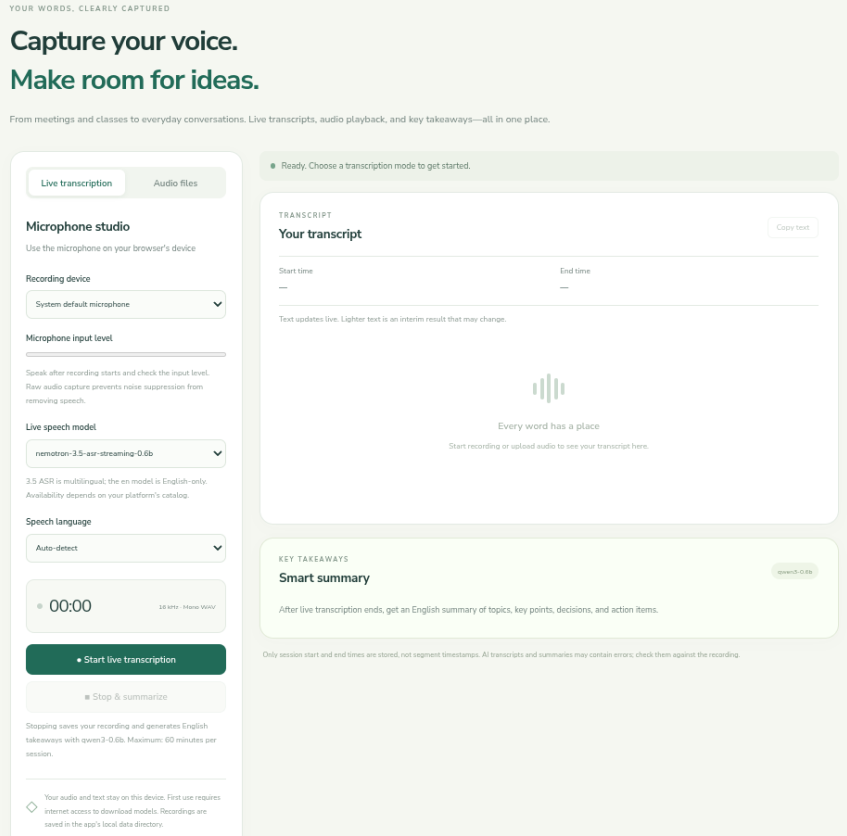
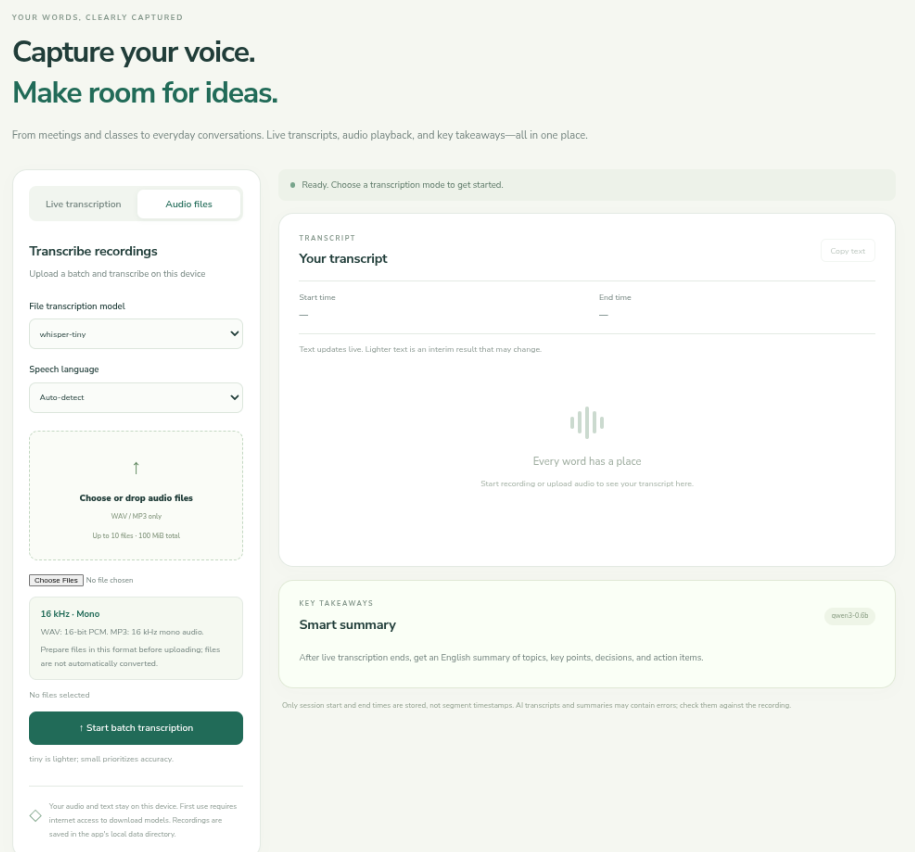
The browser polls every 100 ms, but only rerenders when the serialized job data changes. Confirmed text uses normal styling and provisional text uses a lighter style. A page refresh can restore a completed job from localStorage; an active job is stopped rather than duplicated because a new page cannot safely reattach to the old microphone stream.
When a job finishes, the service returns URLs for:
recording.wav, a 16 kHz mono recording;transcript.txt, readable plain text;transcript.json, structured metadata, segments, warnings, and summary.
The server saves the files before reporting the terminal state, so the UI never exposes a download link for an artifact that does not exist.
11. Deployment checklist
Before using the workbench on another device:
- Confirm
aarch64, a 64-bit operating system, sufficient disk space, and active cooling. - Install dependencies with the interpreter that starts Flask.
- Verify every required model with
catalog.get_model(). - Start with
whisper-tinyif memory is tight. - Keep the service on
127.0.0.1unless an explicit authenticated reverse-proxy boundary is configured. - Test microphone permissions, input level, silence detection, and the stop/flush path.
- Keep the ASR and summary models serialized; do not load both unnecessarily.
- Treat generated summaries as suggestions and check them against the transcript.
12. Conclusion
The project combines browser-side audio processing, a deliberately serialized Flask job service, and Foundry Local’s in-process model runtime:
- AudioWorklet continuously converts microphone input to ordered 16 kHz PCM16 chunks.
- Flask schedules one local inference task at a time and preserves every artifact.
- Foundry Local manages model download, caching, loading, and inference without a cloud dependency.
- Whisper supports uploaded files, streaming Nemotron models support live captions, and Qwen3 turns completed transcripts into short notes.
For a private, low-power, offline voice notebook, this architecture is small enough to understand and practical enough to run on a Raspberry Pi. Its limitations are equally clear: first-use downloads need a network, CPU inference is not instantaneous, and a small local language model still needs human review.